 TOP ROSTERSign in
Install Top Roster
Your roster, one tap away.
iPhone & iPad
Open this page in Safari.
- 1
Tap the Share button
The square with an upward arrow.
- 2
Choose “Add to Home Screen”
Scroll down the Share menu if needed.
- 3
Tap “Add”
Top Roster appears on your Home Screen.
Needed for notifications on iPhone.
Android
- 1Open Top Roster in Chrome, Edge or Samsung Internet.
- 2Tap “Install Top Roster”, then confirm “Install”.
- 3If no button appears, open the browser menu and choose “Install app” or “Add to Home screen”.
Laptop
In Chrome or Edge, select “Install app” here or the install icon in the address bar, then confirm.
Safari installation steps
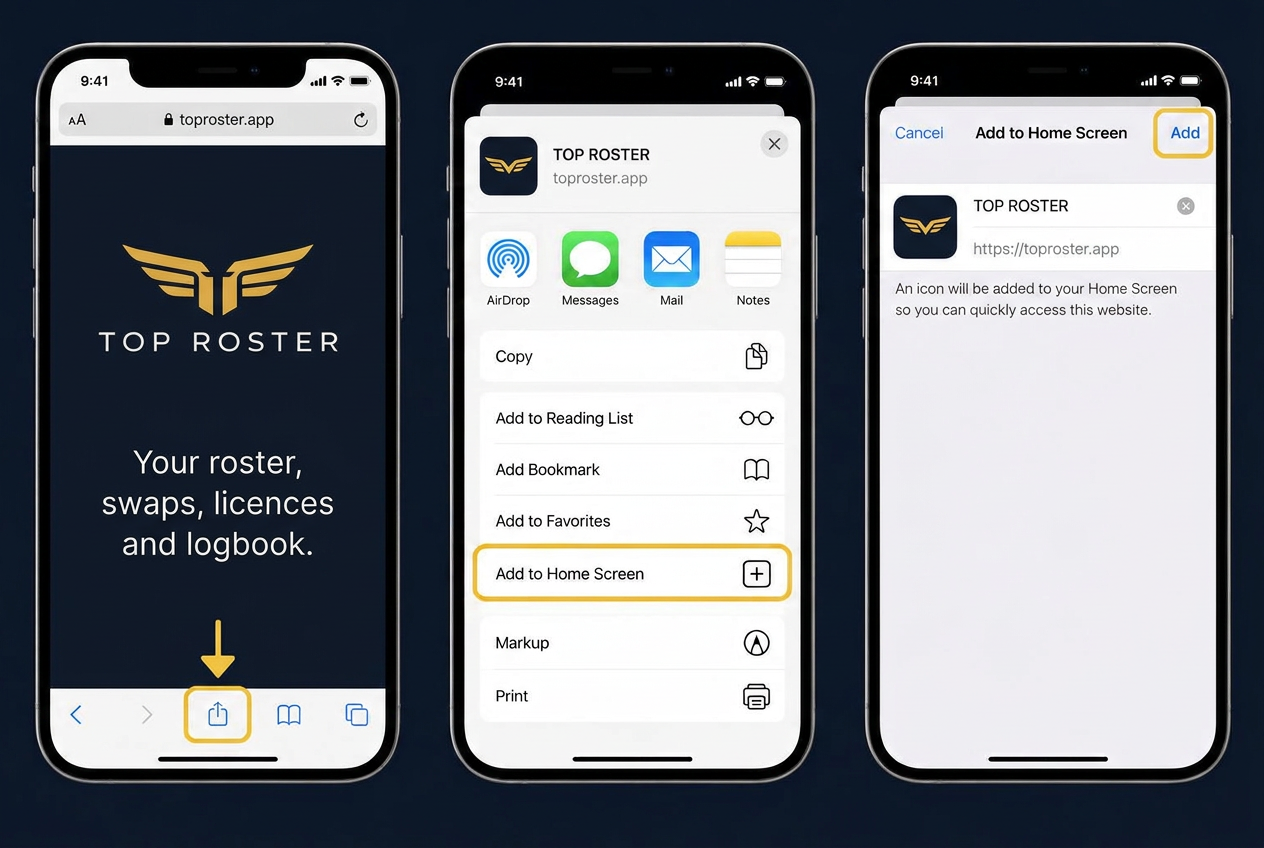
Illustrations. Browser menus may look different on your device.